

How to Program a Remote Control for Your Garage Door: The 2026 Melbourne Guide
Picture yourself pulling into your driveway on a rainy Melbourne evening, only to find your garage door completely unresponsive to your remote's clicks. It is a common headache for many local homeowners who find that their remote won't sync, even after a frantic search for a 'Learn' button that seems to have disappeared into the motor housing. We understand the frustration of a device that refuses to cooperate, especially when it leaves you feeling anxious about your home's security. Mastering how to program remote control for garage door systems is really about understanding the unique "handshake" between your specific motor and the handset.
We believe that managing your home should be effortless and secure. This guide promises to help you navigate the sync process for any remote while ensuring your system complies with the mandatory Cyber Security Rules 2025 that came into effect this year. We will walk you through the exact steps for popular brands like ATA and Gliderol, show you where those elusive buttons are hidden, and provide simple fixes for the connection drops that cause the most trouble. You'll soon have your garage back in perfect working order, providing the reliability and peace of mind you deserve.
Key Takeaways
Identify your motor brand and clear the driveway to ensure a safe, seamless setup before you begin the syncing process.
Master the "Golden Rule" of the 30-second window to successfully learn how to program remote control for garage door units without the usual technical hurdles.
Uncover the brand-specific nuances for ATA, Gliderol, and Jaytech systems that standard manuals often overlook.
Troubleshoot common signal blockages, including the surprising way modern LED globes can interfere with your remote's frequency.
Upgrade your home security by understanding the vital difference between vulnerable fixed-code remotes and modern rolling code technology.
Table of Contents
Preparation: Identifying Your Motor and Remote Type
Before you begin the process of learning how to program remote control for garage door systems, we need to ensure everything is safe and ready. It's a simple task, but one that requires a bit of groundwork to avoid frustration. Start by clearing your garage. Move the car out onto the driveway and make sure the kids and pets are safely inside. You will be cycling the door several times, and a clear path is non-negotiable for safety. We want this to be a smooth, stress-free experience for you.
Next, we need to identify exactly what we are working with. Most Melbourne homes feature motors from trusted brands like Merlin, B&D, or ATA (Automatic Technology). If the branding has rubbed off the casing over the years, don't worry. You can often identify the unit by its shape or the colour of its buttons. For example, older Merlin units often have a distinct green button, while newer ones might have controls tucked behind a sleek, hinged light cover. Grab a sturdy ladder from the shed; you will likely need to reach the motor unit mounted on the ceiling to access the control panel.
Finally, check your remote's battery. A weak battery is the most common reason a programming 'handshake' fails. Even if the little light on your remote flickers, it might not have enough juice to complete the digital sequence. A fresh battery ensures that when you follow the steps for how to program remote control for garage door motors, the signal is strong and clear. This small step prevents the common annoyance of a remote that seems to work one minute and fails the next.
Locating the 'Learn' or 'Code' Button
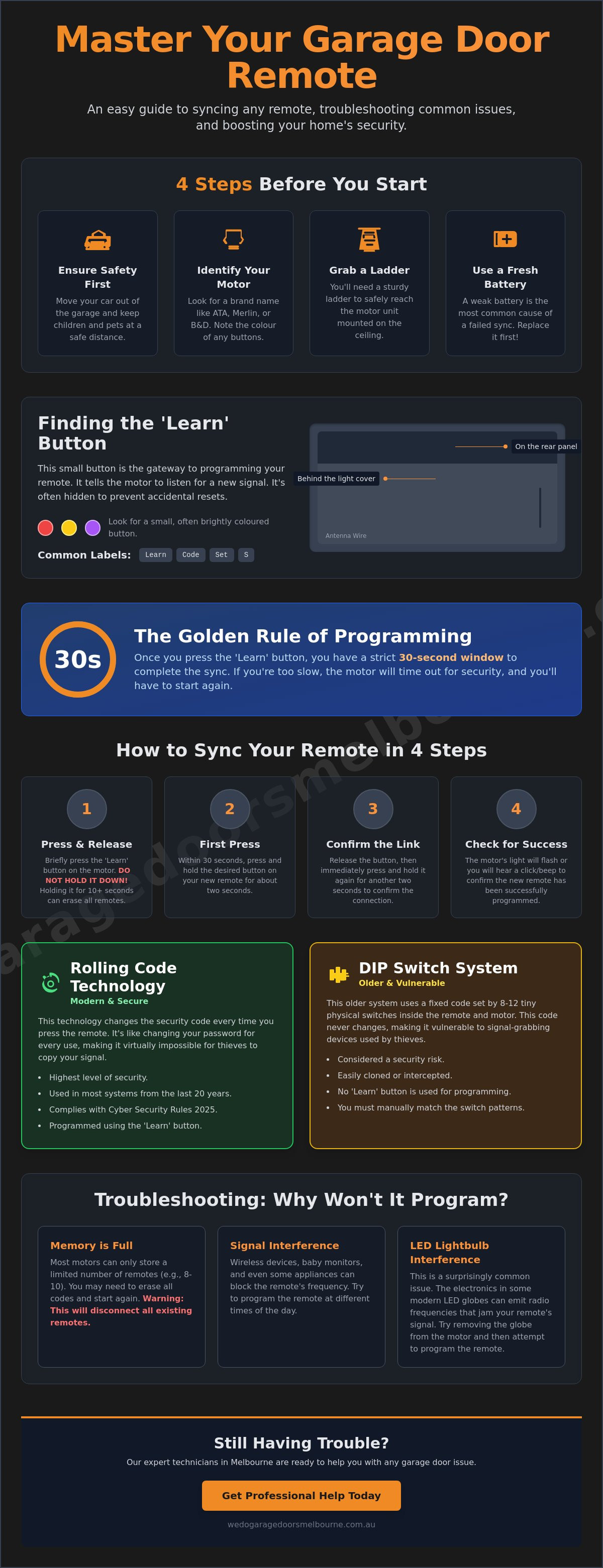
Finding the right button is often the hardest part of the job. On most modern units, this button is located behind the plastic light cover or on the rear panel near the antenna wire. Look for a small button labelled 'Learn', 'Code', 'S', or 'Setup'. They are often brightly coloured in red, yellow, or purple to help them stand out against the circuit board. The 'Learn' button acts as the gateway for the motor to accept new RF signals, essentially telling the motor to listen for your specific remote's unique signature.
Standard vs. Universal Remotes
There is a significant difference between a genuine manufacturer remote and an aftermarket universal clicker. Genuine remotes are designed to work seamlessly with your specific motor's encryption. Most systems manufactured in the last two decades utilise rolling code technology, which changes the digital key every time you press the button to prevent signal theft. If you open your remote and see a row of 8 to 12 tiny manual toggles, you have an older DIP switch system. These don't use a 'Learn' button; instead, you must match the physical pattern of the switches on both the remote and the motor head to establish a connection.
Step-by-Step: Programming Your Remote via the Learn Button
Once you have climbed the ladder and located the control panel, you are ready to begin the handshake process. Understanding how to program remote control for garage door units is mostly about timing. We call this the "Golden Rule": almost every modern motor gives you a strict 30-second window to complete the sync once the Learn button is pressed. If you exceed this time, the motor will time out for security reasons, and you will need to start the sequence again. Following a proper guide to garage door security ensures that your home remains a fortress during this process.
To avoid the common mistake of wiping your motor's entire memory, follow these precise steps:
Step 1: Briefly press and release the 'Learn' or 'Code' button on the motor head. Do not hold it down; a long press of ten seconds or more often acts as a factory reset, which will disconnect every other remote you own.
Step 2: Immediately press the desired button on your new remote control for two seconds.
Step 3: Release the button, then press it again for another two seconds. This second press confirms the digital link and solidifies the rolling code connection.
Step 4: Watch the motor's internal light. If it flashes, or if the unit emits a sharp 'beep', the sync is successful.
Once you master how to program remote control for garage door systems using these steps, you'll feel much more in control of your home's entry points. If the motor doesn't respond, it is often due to the 30-second window closing before the final press.
The Merlin 'Security+ 2.0' Process
Merlin motors, such as the SilentDrive and Tiltmaster series, are incredibly popular across Melbourne. These units often use colour-coded Learn buttons. A yellow button indicates the newer Security+ 2.0 technology, while a green button signifies an older frequency. If you are trying to link a Merlin remote to a smart garage door opener Melbourne homeowners trust, the process is identical, but you may also receive a notification on your smartphone once the pairing is complete. The multi-colour LED feedback will flash rapidly to confirm the remote is now part of your secure network.
B&D Control-A-Door Instructions
B&D systems typically use a button labelled 'Door Code' rather than 'Learn'. For older B&D CAD4 models, you might need to press and hold the 'Door Code' button on the motor while simultaneously pressing the remote button. To verify the code without triggering a full opening cycle, give the remote a very short tap. The motor light should flicker without the door moving. If you find the process a bit fiddly, a quick customer service call can often resolve the issue in minutes, saving you a long afternoon on the ladder.
Brand-Specific Nuances: ATA, Gliderol, and Jaytech
While the basic principles of syncing a remote remain similar across most brands, certain manufacturers have developed unique protocols that can trip up even the most tech-savvy Melbourne homeowner. If you own an ATA system, for instance, the process feels slightly more collaborative. ATA units often require two people—one at the motor and one with the remote. This is because the 'Door Code' button on the main console must be held down continuously while the remote button is being pressed. It is a safety feature designed to prevent accidental programming, but it does mean you might need to recruit a family member or neighbour to help for five minutes.
Gliderol systems present a different kind of puzzle. In many Gliderol setups, the 'Receiver' board is actually a separate component from the main motor drive. You might find yourself looking at the motor casing and seeing no obvious buttons at all. In these cases, you will need to locate the small, separate receiver box, which is often mounted nearby. Jaytech and other generic motors found in many local townhouses typically use a more streamlined 'S' button method. This single-button setup enters a programming mode that simplifies how to program remote control for garage door units, making it a favourite for those who prefer a no-fuss approach.
ATA GDO Series Programming
For those with an ATA GDO console, the 'Code Set' button is your primary point of contact. You can usually find this tucked under the light cover. Beyond just opening the door, these units allow you to program a secondary button for 'Pet Mode', which opens the door just a fraction to let the dog out without exposing your entire garage. If you find your motor is no longer accepting new remotes, you may have hit the memory limit. Most residential ATA boards can store up to 64 individual remote codes. If you have reached this capacity, you will need to clear the memory and start fresh to add your new PTX-6 or PTX-5v2 handsets.
Managing Multiple Doors
If your home has a front gate and multiple garage bays, a 4-button remote is a lifesaver for keeping your keychain light. We recommend organising your buttons logically; for example, use the large top button for the main door and the smaller side buttons for the gate or second bay. This helps avoid 'cross-talk', where a stray finger press accidentally triggers the wrong door while you are halfway down the street. Many of these modern remotes are also compatible with smart home garage door integration, allowing you to bridge the gap between traditional RF remotes and smartphone control for a truly seamless Melbourne lifestyle.
If you have multiple handsets that look identical, applying a small, clear label from dymoonline.com.au can help you quickly identify which remote belongs to which vehicle or door.
Troubleshooting: Why Your Remote Won't Program
You have climbed the ladder, pressed the buttons, and followed the steps, yet the door remains stubbornly still. It is a common frustration, and often the culprit isn't your technique but a hidden technical interference. One of the most frequent issues we see in 2026 involves the humble LED globe. If you have replaced the internal light in your motor with a cheap, aftermarket LED, you may have accidentally installed a signal jammer. Many budget LED globes emit electromagnetic noise that specifically blocks the radio frequency your remote uses. Try unscrewing the globe and attempting the sync again; it is a simple fix that solves the problem more often than you would think.
Frequency clashes are another major factor, especially in high-density areas like Craigieburn. Most older systems operate on the 433MHz band, which is now incredibly crowded with everything from baby monitors to smart doorbells. Newer, more reliable systems have shifted to 868MHz to cut through this digital "fog". If you are struggling with how to program remote control for garage door units, you might also be facing a full memory. While some brands allow more, many standard motors only have 10 to 20 slots for remotes. If you have reached this limit, you will need to perform a master reset to wipe the memory before the motor will accept a new "handshake".
Before you give up, check the physical antenna. This is the small "pigtail" wire hanging from the motor unit. If it has been tucked up inside the plastic housing or has become brittle and snapped, your remote's range will drop to almost zero. Ensure it is hanging straight down to give it the best possible chance of catching the signal. If the motor still isn't responding after you have checked the basics, it might be time for a professional garage door repair to identify deeper electronic faults.
Local Signal Interference in Melbourne's North
In Melbourne's rapidly growing northern suburbs, particularly in newer estates within Wollert and Mickleham, we often encounter significant RF noise. These areas have a high concentration of modern smart home devices that can interfere with the programming process. If your remote won't sync, try a "dark garage" test. Temporarily turn off your home's WiFi and any nearby smart hubs just while you perform the programming. This often clears the airwaves enough for the motor and remote to finally see each other. You should also check for "dead spots" in your driveway where the signal is naturally shielded by the building's structure.
Hardware Failure vs. Programming Error
There is a point where no amount of button-pressing will solve the issue. If the 'Learn' or 'Code' button on your motor head doesn't light up when pressed, or if the unit fails to beep during the confirmation step, the receiver board may be damaged. This often happens after a power surge or a close lightning strike during a Melbourne storm. While we always prefer a simple sync, sometimes an aging receiver is beyond saving. In these instances, a garage door motor replacement Melbourne homeowners trust is often the most reliable way to restore security and convenience to your daily routine.
Security Check: Is Your Garage Door Truly Protected?
Programming your handsets is a vital part of home maintenance, but it also serves as a critical security check for your property. If you are still using a fixed-code remote from the early 2000s, your home is at a higher risk of "code grabbing." This is a technique where intruders intercept your radio signal to clone your remote's digital signature. Upgrading to rolling code technology is now a non-negotiable standard for Melbourne home security. These modern systems generate a new encrypted code every time you press the button, making it virtually impossible for anyone to hijack your access. When you learn how to program remote control for garage door units with this technology, you are adding a sophisticated layer of digital protection to your family home.
If you ever lose a remote, the first thing you must do is de-program it from the motor's memory. This ensures that if the lost handset falls into the wrong hands, it won't grant access to your garage or your house. Moving towards a smartphone-based control system is another excellent way to enhance your safety. These systems often utilise high-level AES-256 encryption and provide real-time alerts to your phone whenever your door is operated. It turns your garage from a potential entry point for intruders into a monitored, secure zone.
Wiping the Motor Memory
If you have recently moved into a new home in Melbourne, we strongly recommend wiping the motor's memory entirely before you start. You never know how many old remotes are still floating around with previous tenants, real estate agents, or tradespeople. Clearing the memory and re-syncing only your trusted remotes is a simple way to start fresh and reclaim your privacy. This process is a vital part of your annual garage door service Melbourne checklist. Once the memory is clear, you can follow the brand-specific steps we have discussed to pair your current handsets one by one.
Professional Support and Upgrades
Sometimes, the peace of mind that comes with a professional touch is worth the investment. If you are struggling with the sync process or feel your current motor is a security weak point, you can always reach out for a professional security audit. We can help you upgrade older, vulnerable motors to modern Merlin or B&D systems that feature the latest encrypted signal technology. As a final tip, we always suggest keeping a spare remote safely inside the house rather than just clipped to the sun visor of your ute. It is a small habit that can save you from a stressful lockout if your primary remote's battery finally gives up after a long day at work.
Getting Your Garage Back on Track
You have now seen that getting your handsets to talk to your motor is less about complex tech wizardry and more about patience and timing. Whether you are navigating the strict 30-second "Golden Rule" for a new sync or clearing out old codes to protect your family's security, you have the knowledge to handle the job like a local expert. Understanding how to program remote control for garage door systems ensures your daily routine remains effortless and your home stays secure against modern digital threats.
If you have followed the steps but find that stubborn signal interference or an aging receiver board is still standing in your way, our team is ready to step in. We have been serving as local Melbourne experts since 2018 and are specialists in Merlin and B&D systems. We provide same-day service for remote and motor issues to ensure you aren't left waiting at the kerb. Need a hand with your remotes? Book a professional Melbourne technician today!
Take that final step today and enjoy the peace of mind that comes with a perfectly synced, reliable garage door.
Frequently Asked Questions
How do I know if my garage door remote is compatible with my motor?
You can determine compatibility by checking the brand and model number printed on your motor head. Most modern remotes operate on specific frequencies, such as 433MHz or 868MHz, and must match the receiver's encryption style. If you are using a Merlin or B&D system, it is always safest to purchase a genuine replacement to ensure a seamless connection. Universal remotes are available, but they must explicitly state they support your motor's specific rolling code technology.
Can I program a new remote if I don't have the original one?
You certainly can program a new handset without the original remote present. The sync process occurs directly between the motor unit on your ceiling and the new remote. As long as you can reach the motor and press the 'Learn' or 'Code' button, you can establish a new connection. This makes it easy to replace a lost or broken handset without needing any previous hardware to complete the setup.
Why does my garage door remote only work when I'm standing right next to the door?
Short range is usually the result of a fading battery or local signal interference. Even if the remote's LED light still flickers, the battery might not have enough power to send a strong signal from the street. If a fresh battery doesn't solve it, check if you've recently installed LED globes in the motor housing. These can create a "noise" that blocks the signal. Ensure the motor's antenna wire is hanging straight down and isn't tucked inside the plastic cover.
How many remotes can I program to a single garage door opener?
Most residential openers in Melbourne can store between 10 and 64 individual codes. While high-end ATA units often accommodate up to 64 remotes, some budget-friendly models might limit you to just 10 or 20. If you find yourself unable to add a new handset after following the steps for how to program remote control for garage door units, you may have reached the motor's memory capacity. In this case, a master reset is required to clear the old codes.
What is the difference between a 'Learn' button and a 'DIP switch' remote?
A 'Learn' button uses modern digital encryption to sync remotes, whereas a DIP switch system relies on manual toggles. Systems built before the early 2000s often have a row of 8 to 12 tiny physical switches inside the remote that must match a identical set on the motor. Modern 'Learn' buttons are far more secure because they utilise rolling codes that change every time the door is operated, preventing potential intruders from copying your signal.
Will programming a new remote erase my old ones?
Programming a single new remote will not erase your existing handsets. The motor simply adds the new code to its list of "trusted" devices. However, be careful not to hold the 'Learn' button down for more than 10 seconds. Doing so usually triggers a factory reset that wipes the entire memory. If this happens, every remote you own will stop working until you manually re-sync each one back to the motor head.
My 'Learn' button is pressed but nothing happens—what's wrong?
This typically points to a hardware fault or a power issue within the motor's receiver board. If the LED light on the motor doesn't flash or change colour when you press the button, the internal electronics may have been damaged by a power surge. Check that the unit is receiving power and that the button feels firm when pressed. If the motor remains unresponsive, it may require a professional inspection to determine if the receiver needs a repair.
Can I program my car's built-in HomeLink button to my Melbourne garage door?
You can often use HomeLink with Australian motors, but it sometimes requires a compatibility bridge. Because how to program remote control for garage door frequencies varies between countries, many Australian Merlin or B&D motors operate on different bands than those used in overseas car manufacturing. If your car won't sync directly to the motor, a small external receiver kit can be installed to bridge the gap between your vehicle and your garage door. If you are also having trouble with your vehicle's digital access or keys, you can check out Pro On The Go Locksmith for professional key fob programming.


Comments